For builders, contractors, interior firms & architects
Every site, every rupee, every task — in one place.
BuildeX runs your projects from the owner's desk to the site supervisor's phone — progress, photos, petty cash, vendor bills, payments and labour, without WhatsApp chasing or Excel copies.
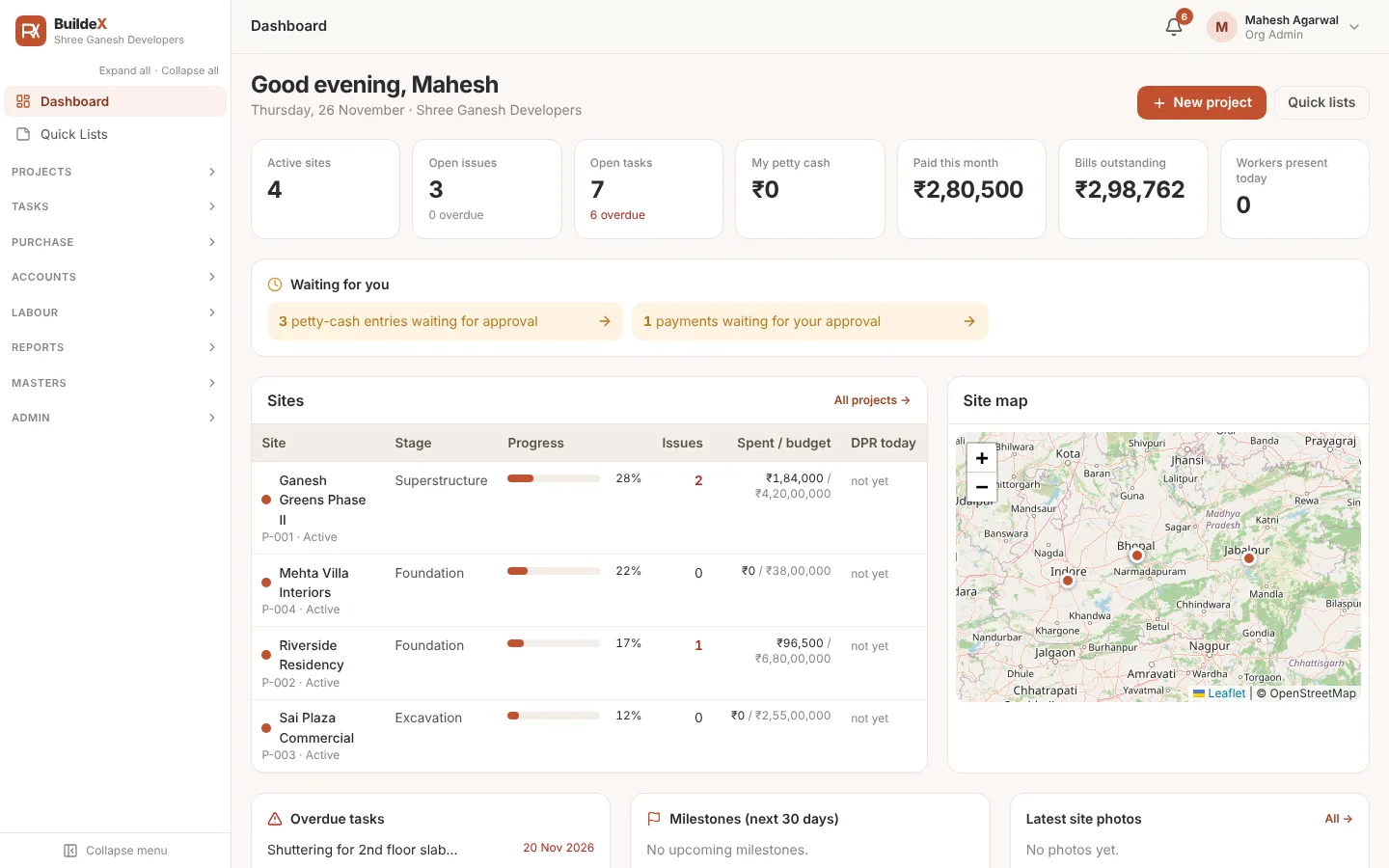
One app instead of
Builders & developers
Colonies, towers and villas — every site, stage and rupee on one screen.
Contractors
Work orders, labour attendance, running bills and payments without the paper chase.
Interior firms
Many small sites at once: tasks, vendor orders, site photos and client sign-off.
Architects
Drawings and plans on the map, site visits, issues and approvals in one place.
Everything a construction office runs on
From the first indent to the last payment.
Built around the registers your office already keeps — the same columns, now connected, approved and searchable.
Projects, stages & schedule
Stage-wise progress, CPM/PERT schedule with the critical path, team and budget per site.
Site photos & issues
Geo-tagged, time-stamped photos. Issues get an owner, a due date and an after-photo to close.
Daily reports & checklists
Daily progress, manpower and inspection checklists by stage — a “No” becomes a task by itself.
Petty cash at site
Supervisor enters Paid to, Purpose, Amount with a bill photo. Approve, settle and top up.
Indent to payment
Requirement → purchase order → material received → vendor bill → payment, matched at each step.
Bills, GST & TDS
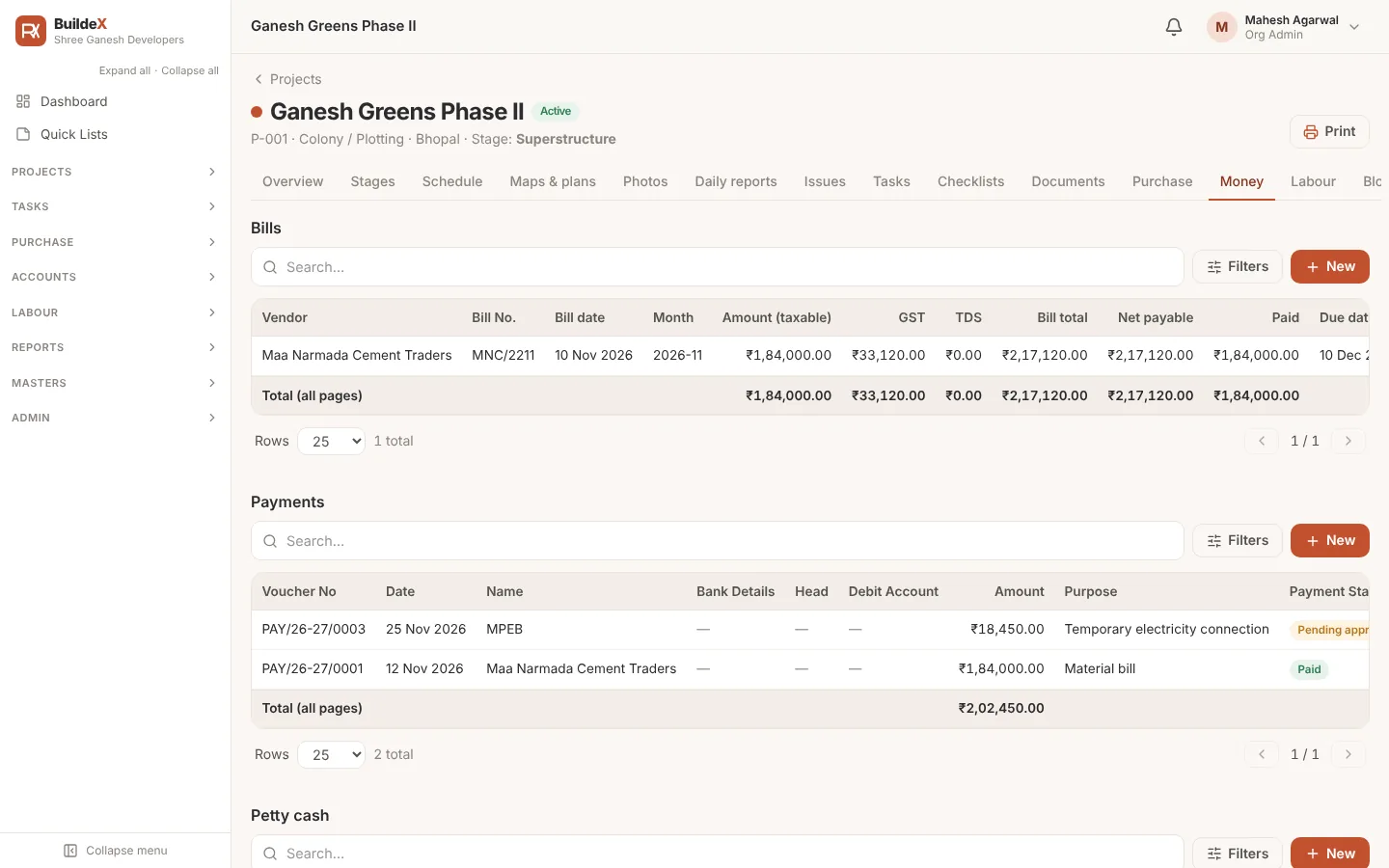
Bill register with CGST/SGST/IGST split, TDS by section, MSME 45-day due dates and duplicate checks.
Payments & approvals
Payments register in your own format, maker-checker approval, bank details masked and change-approved.
Labour & salary lists
Muster at site, overtime and advances, monthly salary list straight to payment.
Quick Lists like Keep
Your tasks, your team's tasks and one card per site. Paste a Keep note and it becomes tasks.
Maps & plans
Upload layout plans or KML boundaries and pin issues and photos right on the drawing.
Reports & Excel
27 ready reports — cost vs budget, vendor ageing, petty-cash register — with Excel export and print.
Audit trail
Every change is logged with who, when and what. Deleted records wait 30 days in a recycle bin.
Site mode
Made for the person standing at the site.
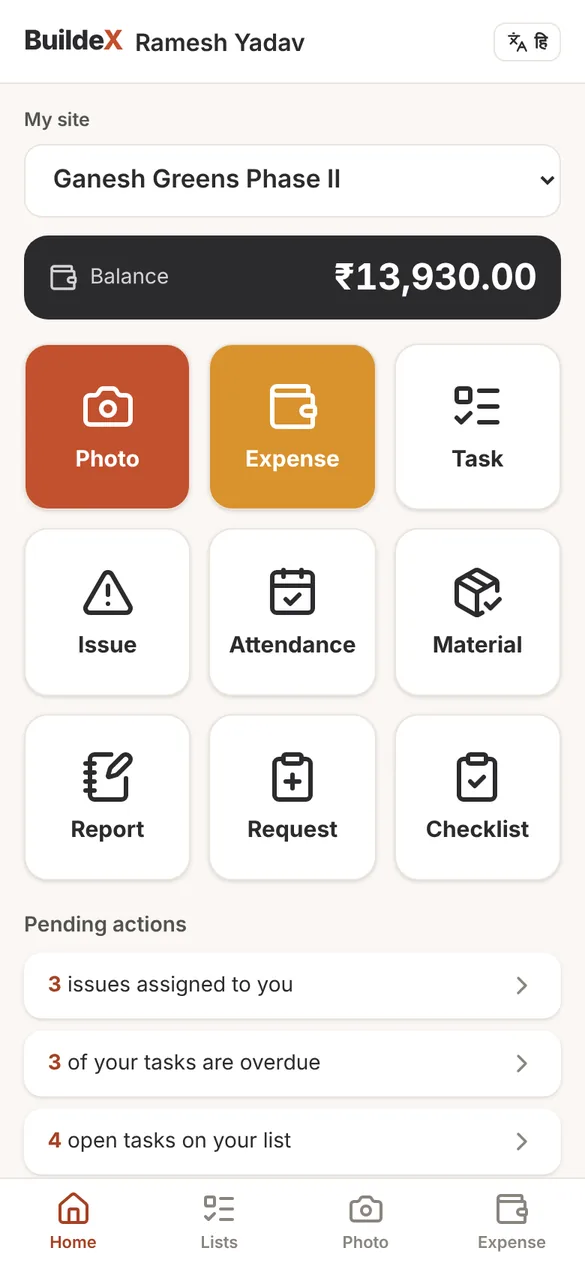
Your supervisor sees nine big buttons, not a software menu. Today's date, their site and their name fill in by themselves.
- Photo with GPS & timeFlagged if taken outside the site boundary.
- Expense in 3 tapsPaid to, amount, bill photo — balance always on top.
- Hindi or EnglishSwitch with one tap; speak instead of typing.
- No network? No problemSaved on the phone, sent when signal returns.
- Attendance & materialMuster for the gang, goods received against the PO.
- Only their siteSupervisors see their assigned sites and nothing else.
For the owner and the accountant
Know where every site and every rupee stands.
- Nothing is paid without approvalMaker-checker on payments, approval limits for project managers, bank-detail changes approved by the owner.
- Bills that check themselvesPO, material received and bill matched; duplicate bill numbers stopped; GST split and TDS worked out.
- Cost vs budget, per siteSpent, committed and budget side by side, with stage progress and the schedule's critical path.
- Ready for your CABill and payment registers, TDS and GST summaries, Tally-ready exports.
Your company's data, under your control
Kept separate
Each company's data is walled off from every other company on BuildeX.
Roles & permissions
Owner, PM, accounts, purchase, site staff, auditor — each sees only what they should.
Full audit trail
Who created, changed, approved or deleted what — and when.
Delete & export on request
Recycle bin for 30 days, full export any time, personal-data removal on request.
See it with your own sites.
Tell us a little about your work. We'll set up a demo company with your kind of projects and walk you through it — usually within one working day.
Will my site supervisor manage it?+
Yes. Site mode has nine big buttons — Photo, Expense, Task, Issue, Attendance and so on — in Hindi or English, with voice typing. Most entries take under 30 seconds.
What if there is no network at site?+
Entries are saved on the phone and upload by themselves when the network comes back. Nothing is lost or entered twice.
Can I bring my existing Excel data?+
Yes. Every register has an Import with a ready template — vendors, workers, payments, bills and more — and Export to Excel any time.
Who can see our data?+
Only your company. Each firm's data is kept separate, every user sees only the sites assigned to them, and every action is logged.